











+1 Wings Keyboard Speed – Run, Fly, and Win More Trophies
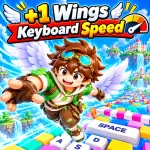
Get ready to run, flap your wings, and soar through the air in +1 Wings Keyboard Speed, where every step boosts your speed and every flight brings you closer to valuable rewards. Sprint along a massive keyboard-themed track, increase your Speed stat, and launch yourself into the sky to reach trophy platforms in the distance. With online multiplayer, every session is a chance to improve your personal best and show off your flying skills. Ready to fly even further?
Gameplay
+1 Wings Keyboard Speed is a casual running and flying game that combines speed-building mechanics, aerial movement, and trophy collection. You begin on a giant track shaped like a keyboard; stepping on each key increases your Speed stat.
When you reach the edge of the track, leap into the air and flap your wings to extend your flight. You can also hold the jump button to glide further, aiming for trophy platforms positioned over the water. Each platform offers different rewards, with those further away granting significantly more trophies.
Jump, Flap, and Glide
As you approach the edge of the track, jump to launch your character into the air. Press the Spacebar to flap your wings and extend your flight time. Holding the Spacebar while airborne allows you to glide further—so control your character with precision to secure the best landing spot.
Your primary goal in +1 Wings Keyboard Speed is to land accurately on a trophy platform. Platforms that are closer are generally easier to reach, while those further away offer much greater rewards. Balance your speed and flight distance to target the most valuable locations.
Upgrading Your Wings
Use the trophies you’ve collected to purchase new wings, auras, and trail effects from the in-game shops. These items allow you to customize your character’s appearance and refresh your flying experience. You can also utilize the "Rebirth" system to earn permanent bonuses, making your future progress even more efficient.
Game Controls
- WASD: Move your character.
- Mouse: Look around.
- Space: Jump.
- Space (while airborne): Flap wings.
- Hold Space (while airborne): Glide.
- E: Interact with the shop.
- B: Return to base.
Similar Games


